
Getting started with your Syslogic AI embedded computer
To help you get up and running quickly, we have compiled the most important information about your device on this page. We wish you a lots of success with your new AI embedded computer!
FAQ

To help you get up and running quickly, we have compiled the most important information about your device on this page. We wish you a lots of success with your new AI embedded computer!
FAQ
The product manual for your device is available for download on the Syslogic SharePoint
Password: wIgHwvPVhm1
An overview of all supported cameras incl. drivers can be found here
Password: wIgHwvPVhm1
To power up your AI embedded computer you need to connect the power supply to the pins 2 (+Power) and 1 (GND) on the M12 connector.
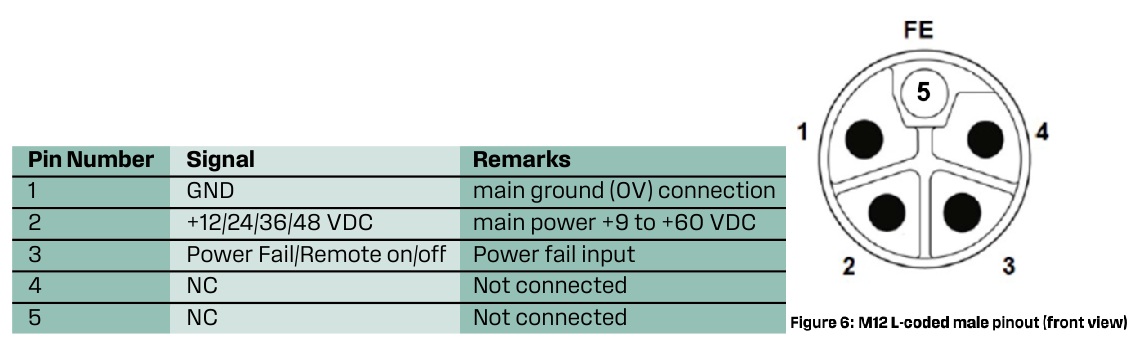
For getting started quickly we provide a AC/DC power supply

The device is already flashed with NVIDIA‘s Jetpack, so you are ready to boot up and log in:
username: nvidia
password: nvidia
NVIDIAs Jetpack is slightly modified to accomodate our Hardware. If you would like to re-flash Jetpack, follow the instructions in the README.md file of the Jetpack release folder
Download the Jetpack for your Syslogic AI Computer from the download section here
Password: wIgHwvPVhm1
Attention: Using the SDK manager and NVIDIAs standard image without our config files will result in a device that won‘t boot!
Should you have any questions regarding your new Syslogic AI embedded computer, take a look at our FAQ
If you can‘t find an answer we are happy to assist you personally: